> For the complete documentation index, see [llms.txt](https://docs.bridgecard.co/llms.txt). Markdown versions of documentation pages are available by appending `.md` to page URLs; this page is available as [Markdown](https://docs.bridgecard.co/reference/api-reference/misc.md).
# Misc
Miscellaneous APIs that we think you might find useful
Get all cardholders
You can use this endpoint to get all the cardholders that have been created in your account.
{% tabs %}
{% tab title="cURL" %}
```
curl --location --request GET 'https://issuecards.api.bridgecard.co/v1/issuing/sandbox/cards/get_all_cardholder?page=1' \
--header 'token: Bearer *****' \
--data-raw ''
```
{% endtab %}
{% tab title="Python" %}
```python
import requests
url = "https://issuecards.api.bridgecard.co/v1/issuing/sandbox/cards/get_all_cardholder?page=1"
payload = ""
headers = {
'token': 'Bearer *****'
}
response = requests.request("GET", url, headers=headers, data=payload)
print(response.text)
```
{% endtab %}
{% tab title="Nodejs" %}
```javascript
var request = require('request');
var options = {
'method': 'GET',
'url': 'https://issuecards.api.bridgecard.co/v1/issuing/sandbox/cards/get_all_cardholder?page=1',
'headers': {
'token': 'Bearer *****'
}
};
request(options, function (error, response) {
if (error) throw new Error(error);
console.log(response.body);
});
```
{% endtab %}
{% tab title="PHP" %}
```php
setUrl('https://issuecards.api.bridgecard.co/v1/issuing/sandbox/cards/get_all_cardholder?page=1');
$request->setMethod(HTTP_Request2::METHOD_GET);
$request->setConfig(array(
'follow_redirects' => TRUE
));
$request->setHeader(array(
'token' => 'Bearer *****'
));
$request->setBody('');
try {
$response = $request->send();
if ($response->getStatus() == 200) {
echo $response->getBody();
}
else {
echo 'Unexpected HTTP status: ' . $response->getStatus() . ' ' .
$response->getReasonPhrase();
}
}
catch(HTTP_Request2_Exception $e) {
echo 'Error: ' . $e->getMessage();
}
```
{% endtab %}
{% tab title="Go" %}
```go
package main
import (
"fmt"
"strings"
"net/http"
"io/ioutil"
)
func main() {
url := "https://issuecards.api.bridgecard.co/v1/issuing/sandbox/cards/get_all_cardholder?page=1"
method := "GET"
payload := strings.NewReader(``)
client := &http.Client {
}
req, err := http.NewRequest(method, url, payload)
if err != nil {
fmt.Println(err)
return
}
req.Header.Add("token", "Bearer *****")
res, err := client.Do(req)
if err != nil {
fmt.Println(err)
return
}
defer res.Body.Close()
body, err := ioutil.ReadAll(res.Body)
if err != nil {
fmt.Println(err)
return
}
fmt.Println(string(body))
}
```
{% endtab %}
{% endtabs %}
Response
🟢 200: All issued cards have been fetched successfully
```
{
"status": "success",
"message": "All your cardholders have been fetched successfully",
"data": {
"cardholders": [
{
"address": {
"address": "9 Jibowu Street",
"city": "Aba North",
"country": "nigeria",
"house_no": "13",
"lga": "Aba North",
"postal_code": "1000242",
"state": "Abia"
},
"cardholder_id": "7da652e1bfc349d996dbfb811e1f3b45",
"created_at": 1659921383,
"email_address": "festusowumi@gmail.com",
"first_name": "John",
"identity_details": {
"blacklisted": false,
"date_of_birth": "1999-02-04",
"first_name": "John",
"gender": "Male",
"id_no": "22222222222",
"id_type": "NIGERIAN_NIN",
"last_name": "Doe",
"phone": "08123456789"
},
"is_active": true,
"is_id_verified": true,
"issuing_app_id": "842352f4-8a6f-4a19-89c6-4e8a240a2355",
"last_name": "Doe",
"phone": "2348164881733"
},
{
"address": {
"address": "9 Jibowu Street",
"city": "Aba North",
"country": "nigeria",
"house_no": "13",
"lga": "Aba North",
"postal_code": "1000242",
"state": "Abia"
},
"cardholder_id": "13404fa9c96a4c43b7f0016b6243ace2",
"created_at": 1659920777,
"email_address": "festusowumi@gmail.com",
"first_name": "John",
"identity_details": {
"blacklisted": false,
"date_of_birth": "1999-02-04",
"first_name": "John",
"gender": "Male",
"id_no": "22222222222",
"id_type": "NIGERIAN_NIN",
"last_name": "Doe",
"phone": "08123456789"
},
"is_active": true,
"is_id_verified": true,
"issuing_app_id": "842352f4-8a6f-4a19-89c6-4e8a240a2355",
"last_name": "Doe",
"phone": "2348135471627"
}
],
"meta": {
"total": 2,
"pages": 1,
"previous": null,
"next": null
}
}
}
```
## Get all issued cards
This endpoint returns a list of all the cards that you have issued on your account
{% tabs %}
{% tab title="cURL" %}
```
curl --location --request GET 'https://issuecards.api.bridgecard.co/v1/issuing/sandbox/cards/get_all_cards?page=1' \
--header 'token: Bearer *****' \
--data-raw ''
```
{% endtab %}
{% tab title="Python" %}
```python
import requests
url = "https://issuecards.api.bridgecard.co/v1/issuing/sandbox/cards/get_all_cards?page=1"
payload = ""
headers = {
'token': 'Bearer *****'
}
response = requests.request("GET", url, headers=headers, data=payload)
print(response.text)
```
{% endtab %}
{% tab title="Nodejs" %}
```javascript
var request = require('request');
var options = {
'method': 'GET',
'url': 'https://issuecards.api.bridgecard.co/v1/issuing/sandbox/cards/get_all_cards?page=1',
'headers': {
'token': 'Bearer *****'
}
};
request(options, function (error, response) {
if (error) throw new Error(error);
console.log(response.body);
});
```
{% endtab %}
{% tab title="PHP" %}
```php
setUrl('https://issuecards.api.bridgecard.co/v1/issuing/sandbox/cards/get_all_cards?page=1');
$request->setMethod(HTTP_Request2::METHOD_GET);
$request->setConfig(array(
'follow_redirects' => TRUE
));
$request->setHeader(array(
'token' => 'Bearer *****'
));
$request->setBody('');
try {
$response = $request->send();
if ($response->getStatus() == 200) {
echo $response->getBody();
}
else {
echo 'Unexpected HTTP status: ' . $response->getStatus() . ' ' .
$response->getReasonPhrase();
}
}
catch(HTTP_Request2_Exception $e) {
echo 'Error: ' . $e->getMessage();
}
```
{% endtab %}
{% tab title="Go" %}
```go
package main
import (
"fmt"
"strings"
"net/http"
"io/ioutil"
)
func main() {
url := "https://issuecards.api.bridgecard.co/v1/issuing/sandbox/cards/get_all_cards?page=1"
method := "GET"
payload := strings.NewReader(``)
client := &http.Client {
}
req, err := http.NewRequest(method, url, payload)
if err != nil {
fmt.Println(err)
return
}
req.Header.Add("token", "Bearer *****")
res, err := client.Do(req)
if err != nil {
fmt.Println(err)
return
}
defer res.Body.Close()
body, err := ioutil.ReadAll(res.Body)
if err != nil {
fmt.Println(err)
return
}
fmt.Println(string(body))
}
```
{% endtab %}
{% endtabs %}
Response
🟢 200: All issued cards have been fetched successfully
```
{
"status": "success",
"message": "All your issued cards have been fetched successfully",
"data": {
"cards": [
{
"billing_address": {
"billing_address1": "256 Chapman Road STE 105-4",
"billing_city": "Newark",
"billing_country": "US",
"billing_zip_code": "19702",
"country_code": "US"
},
"brand": "Mastercard",
"card_currency": "USD",
"card_id": "70b34986c13c4026a999999e27eabc49",
"card_name": "John Doe",
"card_number": "ev:RFVC:/k2ywhfd6puozkZx:A23n3EoM5dZwHG24zaS+meBBIbgJ03OCfO6GnFSPl5tS:1BLgOZHre56P9DPkhqHJJaifHnlvzGzQ5sSrn+xWcT8:$",
"card_type": "virtual",
"cardholder_id": "d0658fedf82866d9699999083fa",
"created_at": 1659826136,
"cvv": "ev:RFVC:5ek3QdaiLFvaL4md:A23n3EoM5dZwHG24zaS+meBBIbgJ03OCfO6GnFSPl5tS:aI3XxL+A54ZITT9/zPjV11J0yA:$",
"expiry_month": "ev:RFVC:gDwn8Kqsg9rmVSeK:A23n3EoM5dZwHG24zaS+meBBIbgJ03OCfO6GnFSPl5tS:QpMwLxi1g+uVpB88+XKtg6Dp:$",
"expiry_year": "ev:RFVC:bOzx6EkH6brriobW:A23n3EoM5dZwHG24zaS+meBBIbgJ03OCfO6GnFSPl5tS:mKtDnYDJ9pdoa2Pz01gl4qEDLB4:$",
"is_active": true,
"issuing_app_id": "842352f4-8a6f-4a19-89c6-999940a2355",
"last_4": "8623",
"livemode": false,
"meta_data": null
},
{
"billing_address": {
"billing_address1": "256 Chapman Road STE 105-4",
"billing_city": "Newark",
"billing_country": "US",
"billing_zip_code": "19702",
"country_code": "US"
},
"brand": "Mastercard",
"card_currency": "USD",
"card_id": "581b044df66a4a428bc9999915655e8e",
"card_name": "John Doe",
"card_number": "ev:RFVC:Gh4YvEoa8/Ua8gtC:AyY2y7CaFrWCiWB7GZKI4+w/b4kLhyQaP4r0/hsVSOB/:dGwEilDdCqrdBKjFyKzkBToxefEpCguuF+rRfFsJfCo:$",
"card_type": "virtual",
"cardholder_id": "d0658fedf82842079999961e4a7083fa",
"created_at": 1659746672,
"cvv": "ev:RFVC:3AlzAf1BTFg2SYYG:AyY2y7CaFrWCiWB7GZKI4+w/b4kLhyQaP4r0/hsVSOB/:9O7on5JfbNcyhpo2Ggp97+A8wQ:$",
"expiry_month": "ev:RFVC:8m9dVKhiQNVbmJtL:AyY2y7CaFrWCiWB7GZKI4+w/b4kLhyQaP4r0/hsVSOB/:ieCzK8W29dimD8k8aPCC4ama:$",
"expiry_year": "ev:RFVC:i1L76Uhr2nicnoRV:AyY2y7CaFrWCiWB7GZKI4+w/b4kLhyQaP4r0/hsVSOB/:39Qlfqi7eQWiqFqMTqfZ8mgzj40:$",
"is_active": true,
"issuing_app_id": "842352f4-8a6f-4a19-89c6-440a2355",
"last_4": "8615",
"livemode": false,
"meta_data": {
"user_id": "d0658fedf8284207866d96083fa"
}
}
],
"meta": {
"total": 2,
"pages": 1,
"previous": null,
"next": null
}
}
}
```
## Fund issuing wallet
SANDBOX
You can use this endpoint to credit your issuing wallet with some fake money in the sandbox environment.
{% tabs %}
{% tab title="cURL" %}
```
curl --location --request PATCH 'https://issuecards.api.bridgecard.co/v1/issuing/sandbox/cards/fund_issuing_wallet?currency=NGNorUSD' \
--header 'token: Bearer *****' \
--header 'Content-Type: application/json' \
--data-raw '{
"amount": "0"
}'
```
{% endtab %}
{% tab title="Python" %}
```python
import requests
import json
url = "https://issuecards.api.bridgecard.co/v1/issuing/sandbox/cards/fund_issuing_wallet?currency=NGNorUSD"
payload = json.dumps({
"amount": "0"
})
headers = {
'token': 'Bearer *****',
'Content-Type': 'application/json'
}
response = requests.request("PATCH", url, headers=headers, data=payload)
print(response.text)
```
{% endtab %}
{% tab title="Nodejs" %}
```javascript
var request = require('request');
var options = {
'method': 'PATCH',
'url': 'https://issuecards.api.bridgecard.co/v1/issuing/sandbox/cards/fund_issuing_wallet?currency=NGNorUSD',
'headers': {
'token': 'Bearer *****',
'Content-Type': 'application/json'
},
body: JSON.stringify({
"amount": "0",
"currency": "NGN or USD"
})
};
request(options, function (error, response) {
if (error) throw new Error(error);
console.log(response.body);
});
```
{% endtab %}
{% tab title="PHP" %}
```php
setUrl('https://issuecards.api.bridgecard.co/v1/issuing/sandbox/cards/fund_issuing_wallet?currency=NGNorUSD');
$request->setMethod('PATCH');
$request->setConfig(array(
'follow_redirects' => TRUE
));
$request->setHeader(array(
'token' => 'Bearer *****',
'Content-Type' => 'application/json'
));
$request->setBody('{\n "amount": "0"\n}');
try {
$response = $request->send();
if ($response->getStatus() == 200) {
echo $response->getBody();
}
else {
echo 'Unexpected HTTP status: ' . $response->getStatus() . ' ' .
$response->getReasonPhrase();
}
}
catch(HTTP_Request2_Exception $e) {
echo 'Error: ' . $e->getMessage();
}
```
{% endtab %}
{% tab title="Go" %}
```go
package main
import (
"fmt"
"strings"
"net/http"
"io/ioutil"
)
func main() {
url := "https://issuecards.api.bridgecard.co/v1/issuing/sandbox/cards/fund_issuing_wallet?currency=NGNorUSD"
method := "PATCH"
payload := strings.NewReader(`{
"amount": "0"
}`)
client := &http.Client {
}
req, err := http.NewRequest(method, url, payload)
if err != nil {
fmt.Println(err)
return
}
req.Header.Add("token", "Bearer *****")
req.Header.Add("Content-Type", "application/json")
res, err := client.Do(req)
if err != nil {
fmt.Println(err)
return
}
defer res.Body.Close()
body, err := ioutil.ReadAll(res.Body)
if err != nil {
fmt.Println(err)
return
}
fmt.Println(string(body))
}
```
{% endtab %}
{% endtabs %}
Body
Response
🟢 200: card was funded successfully.
```
{
"status": "success",
"message": "Your issuing wallet was funded successfully",
"data": {}
}
```
PRODUCTION
To begin the process of funding your account in production:
1. Login to your dashboard.
2. Click the + icon on your production wallet on your dashboard to begin the transfer process.
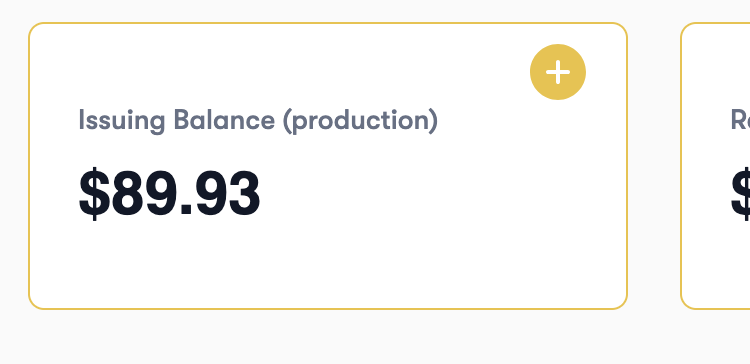 Note: We now support funding your production account automatically in USDT, XAF and UGX.
## Get issuing wallet balance
You can use this wallet to fetch the current balance on your issuing wallet.
{% tabs %}
{% tab title="cURL" %}
```
curl --location --request GET 'https://issuecards.api.bridgecard.co/v1/issuing/sandbox/cards/get_issuing_wallet_balance' \
--header 'token: Bearer *****' \
--data-raw ''
```
{% endtab %}
{% tab title="Python" %}
```python
import requests
url = "https://issuecards.api.bridgecard.co/v1/issuing/sandbox/cards/get_issuing_wallet_balance"
payload = ""
headers = {
'token': 'Bearer *****'
}
response = requests.request("GET", url, headers=headers, data=payload)
print(response.text)
```
{% endtab %}
{% tab title="Nodejs" %}
```javascript
var request = require('request');
var options = {
'method': 'GET',
'url': 'https://issuecards.api.bridgecard.co/v1/issuing/sandbox/cards/get_issuing_wallet_balance',
'headers': {
'token': 'Bearer *****'
}
};
request(options, function (error, response) {
if (error) throw new Error(error);
console.log(response.body);
});
```
{% endtab %}
{% tab title="PHP" %}
```php
setUrl('https://issuecards.api.bridgecard.co/v1/issuing/sandbox/cards/get_issuing_wallet_balance');
$request->setMethod(HTTP_Request2::METHOD_GET);
$request->setConfig(array(
'follow_redirects' => TRUE
));
$request->setHeader(array(
'token' => 'Bearer *****'
));
$request->setBody('');
try {
$response = $request->send();
if ($response->getStatus() == 200) {
echo $response->getBody();
}
else {
echo 'Unexpected HTTP status: ' . $response->getStatus() . ' ' .
$response->getReasonPhrase();
}
}
catch(HTTP_Request2_Exception $e) {
echo 'Error: ' . $e->getMessage();
}
```
{% endtab %}
{% tab title="Go" %}
```go
package main
import (
"fmt"
"strings"
"net/http"
"io/ioutil"
)
func main() {
url := "https://issuecards.api.bridgecard.co/v1/issuing/sandbox/cards/get_issuing_wallet_balance"
method := "GET"
payload := strings.NewReader(``)
client := &http.Client {
}
req, err := http.NewRequest(method, url, payload)
if err != nil {
fmt.Println(err)
return
}
req.Header.Add("token", "Bearer *****")
res, err := client.Do(req)
if err != nil {
fmt.Println(err)
return
}
defer res.Body.Close()
body, err := ioutil.ReadAll(res.Body)
if err != nil {
fmt.Println(err)
return
}
fmt.Println(string(body))
}
```
{% endtab %}
{% endtabs %}
Note: We now support funding your production account automatically in USDT, XAF and UGX.
## Get issuing wallet balance
You can use this wallet to fetch the current balance on your issuing wallet.
{% tabs %}
{% tab title="cURL" %}
```
curl --location --request GET 'https://issuecards.api.bridgecard.co/v1/issuing/sandbox/cards/get_issuing_wallet_balance' \
--header 'token: Bearer *****' \
--data-raw ''
```
{% endtab %}
{% tab title="Python" %}
```python
import requests
url = "https://issuecards.api.bridgecard.co/v1/issuing/sandbox/cards/get_issuing_wallet_balance"
payload = ""
headers = {
'token': 'Bearer *****'
}
response = requests.request("GET", url, headers=headers, data=payload)
print(response.text)
```
{% endtab %}
{% tab title="Nodejs" %}
```javascript
var request = require('request');
var options = {
'method': 'GET',
'url': 'https://issuecards.api.bridgecard.co/v1/issuing/sandbox/cards/get_issuing_wallet_balance',
'headers': {
'token': 'Bearer *****'
}
};
request(options, function (error, response) {
if (error) throw new Error(error);
console.log(response.body);
});
```
{% endtab %}
{% tab title="PHP" %}
```php
setUrl('https://issuecards.api.bridgecard.co/v1/issuing/sandbox/cards/get_issuing_wallet_balance');
$request->setMethod(HTTP_Request2::METHOD_GET);
$request->setConfig(array(
'follow_redirects' => TRUE
));
$request->setHeader(array(
'token' => 'Bearer *****'
));
$request->setBody('');
try {
$response = $request->send();
if ($response->getStatus() == 200) {
echo $response->getBody();
}
else {
echo 'Unexpected HTTP status: ' . $response->getStatus() . ' ' .
$response->getReasonPhrase();
}
}
catch(HTTP_Request2_Exception $e) {
echo 'Error: ' . $e->getMessage();
}
```
{% endtab %}
{% tab title="Go" %}
```go
package main
import (
"fmt"
"strings"
"net/http"
"io/ioutil"
)
func main() {
url := "https://issuecards.api.bridgecard.co/v1/issuing/sandbox/cards/get_issuing_wallet_balance"
method := "GET"
payload := strings.NewReader(``)
client := &http.Client {
}
req, err := http.NewRequest(method, url, payload)
if err != nil {
fmt.Println(err)
return
}
req.Header.Add("token", "Bearer *****")
res, err := client.Do(req)
if err != nil {
fmt.Println(err)
return
}
defer res.Body.Close()
body, err := ioutil.ReadAll(res.Body)
if err != nil {
fmt.Println(err)
return
}
fmt.Println(string(body))
}
```
{% endtab %}
{% endtabs %}
Response
🟢 200: Issuing wallet balance has been fetched successfully
```
{
"status": "success",
"message": "Your issuing wallet balance has been fetched successfully",
"data": {
"issuing_balance_USD": "23750"
}
}
```
## Get FX rate
This endpoint provides you with the rates at which we perform trades from local currencies to the USD.
This endpoint is rate limited once every minute(fx\_rate).
{% tabs %}
{% tab title="cURL" %}
```
curl --location --request GET 'https://issuecards.api.bridgecard.co/v1/issuing/cards/fx-rate' \
--header 'accept: application/json' \
--header 'token: Bearer xxxxx'
```
{% endtab %}
{% tab title="Python" %}
```python
import requests
url = "https://issuecards.api.bridgecard.co/v1/issuing/cards/fx-rate"
payload={}
headers = {
'accept': 'application/json',
'token': 'Bearer xxxxx'
}
response = requests.request("GET", url, headers=headers, data=payload)
print(response.text)
```
{% endtab %}
{% tab title="Nodejs" %}
```javascript
var request = require('request');
var options = {
'method': 'GET',
'url': 'https://issuecards.api.bridgecard.co/v1/issuing/cards/fx-rate',
'headers': {
'accept': 'application/json',
'token': 'Bearer xxxxx'
}
};
request(options, function (error, response) {
if (error) throw new Error(error);
console.log(response.body);
});
```
{% endtab %}
{% tab title="PHP" %}
```php
setUrl('https://issuecards.api.bridgecard.co/v1/issuing/cards/fx-rate');
$request->setMethod(HTTP_Request2::METHOD_GET);
$request->setConfig(array(
'follow_redirects' => TRUE
));
$request->setHeader(array(
'accept' => 'application/json',
'token' => 'Bearer xxxxx'
));
try {
$response = $request->send();
if ($response->getStatus() == 200) {
echo $response->getBody();
}
else {
echo 'Unexpected HTTP status: ' . $response->getStatus() . ' ' .
$response->getReasonPhrase();
}
}
catch(HTTP_Request2_Exception $e) {
echo 'Error: ' . $e->getMessage();
}
```
{% endtab %}
{% tab title="Go" %}
```go
package main
import (
"fmt"
"net/http"
"io/ioutil"
)
func main() {
url := "https://issuecards.api.bridgecard.co/v1/issuing/cards/fx-rate"
method := "GET"
client := &http.Client {
}
req, err := http.NewRequest(method, url, nil)
if err != nil {
fmt.Println(err)
return
}
req.Header.Add("accept", "application/json")
req.Header.Add("token", "Bearer xxxxx")
res, err := client.Do(req)
if err != nil {
fmt.Println(err)
return
}
defer res.Body.Close()
body, err := ioutil.ReadAll(res.Body)
if err != nil {
fmt.Println(err)
return
}
fmt.Println(string(body))
}
```
{% endtab %}
{% endtabs %}
Response
🟢 200 : states fetched successfully
```
{
"status": "success",
"message": "Rate fetched successfully",
"data": {
"NGN-USD": 74100
}
}
```
## Get all states
This endpoint provides you with a list of states under a country.
{% tabs %}
{% tab title="cURL" %}
```
curl --location --request GET 'https://issuecards.api.bridgecard.co/v1/issuing/sandbox/cardholder/get_all_states?country=Nigeria' \
--header 'accept: application/json' \
--header 'token: Bearer at_live_****'
```
{% endtab %}
{% tab title="Python" %}
```python
import requests
url = "https://issuecards.api.bridgecard.co/v1/issuing/sandbox/cardholder/get_all_states?country=Nigeria"
payload={}
headers = {
'accept': 'application/json',
'token': 'Bearer at_live_****'
}
response = requests.request("GET", url, headers=headers, data=payload)
print(response.text)
```
{% endtab %}
{% tab title="Nodejs" %}
```javascript
var request = require('request');
var options = {
'method': 'GET',
'url': 'https://issuecards.api.bridgecard.co/v1/issuing/sandbox/cardholder/get_all_states?country=Nigeria',
'headers': {
'accept': 'application/json',
'token': 'Bearer at_live_****'
}
};
request(options, function (error, response) {
if (error) throw new Error(error);
console.log(response.body);
});
```
{% endtab %}
{% tab title="PHP" %}
```php
setUrl('https://issuecards.api.bridgecard.co/v1/issuing/sandbox/cardholder/get_all_states?country=Nigeria');
$request->setMethod(HTTP_Request2::METHOD_GET);
$request->setConfig(array(
'follow_redirects' => TRUE
));
$request->setHeader(array(
'accept' => 'application/json',
'token' => 'Bearer at_live_****'
));
try {
$response = $request->send();
if ($response->getStatus() == 200) {
echo $response->getBody();
}
else {
echo 'Unexpected HTTP status: ' . $response->getStatus() . ' ' .
$response->getReasonPhrase();
}
}
catch(HTTP_Request2_Exception $e) {
echo 'Error: ' . $e->getMessage();
}
```
{% endtab %}
{% tab title="Go" %}
```go
package main
import (
"fmt"
"net/http"
"io/ioutil"
)
func main() {
url := "https://issuecards.api.bridgecard.co/v1/issuing/sandbox/cardholder/get_all_states?country=Nigeria"
method := "GET"
client := &http.Client {
}
req, err := http.NewRequest(method, url, nil)
if err != nil {
fmt.Println(err)
return
}
req.Header.Add("accept", "application/json")
req.Header.Add("token", "Bearer at_live_****")
res, err := client.Do(req)
if err != nil {
fmt.Println(err)
return
}
defer res.Body.Close()
body, err := ioutil.ReadAll(res.Body)
if err != nil {
fmt.Println(err)
return
}
fmt.Println(string(body))
}
```
{% endtab %}
{% endtabs %}
Response
🟢 201 : states fetched successfully
```
{
"status": "success",
"message": "States fetched successfully",
"data": {
"states": [
"Abuja",
"Abia",
"Adamawa",
"Akwa Ibom",
"Anambra",
"Bauchi",
"Bayelsa",
"Benue",
"Borno",
"Cross River",
"Delta",
"Ebonyi",
"Edo",
"Ekiti",
"Enugu",
"Gombe",
"Imo",
"Jigawa",
"Kaduna",
"Kano",
"Katsina",
"Kebbi",
"Kogi",
"Kwara",
"Lagos",
"Nasarawa",
"Niger",
"Ogun",
"Ondo",
"Osun",
"Oyo",
"Plateau",
"Rivers",
"Sokoto",
"Taraba",
"Yobe",
"Zamfara"
]
}
}
```
## Get card details using Token
You can also generate card details using a secure token and in a PCIDSS-compliant way, so you can stay out of scope and not interface with the user's sensitive card details. Please see the steps below.
1. Your client side application should make a request to your backend asking it for a token that it can use to view the users card details.
2. Your backend will authorize this request and then make an API call to Bridgecard's API to get a onetime token, valid for 5mins to view the card details. Your backend can request for this token from Bridgecard by calling this endpoint.
{% tabs %}
{% tab title="cURL" %}
```
curl --location --request GET 'https://issuecards.api.bridgecard.co/v1/issuing/cards/generate_token_for_card_details?card_id=38f18939933303039393' \
--header 'token: Bearer *****' \
--data-raw ''
```
{% endtab %}
{% tab title="Python" %}
```python
import requests
url = "https://issuecards.api.bridgecard.co/v1/issuing/cards/generate_token_for_card_details?card_id=38f18939933303039393"
payload = ""
headers = {
'token': 'Bearer *****'
}
response = requests.request("GET", url, headers=headers, data=payload)
print(response.text)
```
{% endtab %}
{% tab title="Nodejs" %}
```javascript
var request = require('request');
var options = {
'method': 'GET',
'url': 'https://issuecards.api.bridgecard.co/v1/issuing/cards/generate_token_for_card_details?card_id=38f18939933303039393',
'headers': {
'token': 'Bearer *****'
}
};
request(options, function (error, response) {
if (error) throw new Error(error);
console.log(response.body);
});
```
{% endtab %}
{% tab title="PHP" %}
```php
setUrl('https://issuecards.api.bridgecard.co/v1/issuing/cards/generate_token_for_card_details?card_id=38f18939933303039393');
$request->setMethod(HTTP_Request2::METHOD_GET);
$request->setConfig(array(
'follow_redirects' => TRUE
));
$request->setHeader(array(
'token' => 'Bearer *****'
));
$request->setBody('');
try {
$response = $request->send();
if ($response->getStatus() == 200) {
echo $response->getBody();
}
else {
echo 'Unexpected HTTP status: ' . $response->getStatus() . ' ' .
$response->getReasonPhrase();
}
}
catch(HTTP_Request2_Exception $e) {
echo 'Error: ' . $e->getMessage();
}
```
{% endtab %}
{% tab title="Go" %}
```go
package main
import (
"fmt"
"strings"
"net/http"
"io/ioutil"
)
func main() {
url := "https://issuecards.api.bridgecard.co/v1/issuing/cards/generate_token_for_card_details?card_id=38f18939933303039393"
method := "GET"
payload := strings.NewReader(``)
client := &http.Client {
}
req, err := http.NewRequest(method, url, payload)
if err != nil {
fmt.Println(err)
return
}
req.Header.Add("token", "Bearer *****")
res, err := client.Do(req)
if err != nil {
fmt.Println(err)
return
}
defer res.Body.Close()
body, err := ioutil.ReadAll(res.Body)
if err != nil {
fmt.Println(err)
return
}
fmt.Println(string(body))
}
```
{% endtab %}
{% endtabs %}
Response
🟢 200: Card token generated successfully.
```
{
"status": "success",
"message": "Card token generated successfully, token is only valid for 5 minutes.",
"data": {
"token": "bd8dc269872144f5b122da743277d470"
}
}
```
🔴 400: Invalid card ID
```
{
"message": "Invalid card ID, there's no card with this ID."
}
```
🔴 504: We ran into an error creating the card
```
{
"message": "We ran into an error running this operation, please try again."
```
3. Your backend should send your client-side application this token as a response.
4. Your client side will then make a request to Bridgecard's API to fetch the decrypted details, using the endpoint below.
{% tabs %}
{% tab title="cURL" %}
```
curl --location --request GET 'https://issuecards-api-bridgecard-co.relay.evervault.com/v1/issuing/cards/get_card_details_from_token?token=6419a7034aa44f1c886a2ade32a97436' \
--data-raw ''
```
{% endtab %}
{% tab title="Python" %}
```python
import requests
url = "https://issuecards-api-bridgecard-co.relay.evervault.com/v1/issuing/cards/get_card_details_from_token?token=6419a7034aa44f1c886a2ade32a97436"
payload = ""
response = requests.request("GET", url, data=payload)
print(response.text)
```
{% endtab %}
{% tab title="Nodejs" %}
```javascript
var request = require('request');
var options = {
'method': 'GET',
'url': 'https://issuecards-api-bridgecard-co.relay.evervault.com/v1/issuing/cards/get_card_details_from_token?token=6419a7034aa44f1c886a2ade32a97436',
};
request(options, function (error, response) {
if (error) throw new Error(error);
console.log(response.body);
});
```
{% endtab %}
{% tab title="PHP" %}
```php
setUrl('https://issuecards-api-bridgecard-co.relay.evervault.com/v1/issuing/cards/get_card_details_from_token?token=6419a7034aa44f1c886a2ade32a97436');
$request->setMethod(HTTP_Request2::METHOD_GET);
$request->setConfig(array(
'follow_redirects' => TRUE
));
$request->setBody('');
try {
$response = $request->send();
if ($response->getStatus() == 200) {
echo $response->getBody();
}
else {
echo 'Unexpected HTTP status: ' . $response->getStatus() . ' ' .
$response->getReasonPhrase();
}
}
catch(HTTP_Request2_Exception $e) {
echo 'Error: ' . $e->getMessage();
}
```
{% endtab %}
{% tab title="Go" %}
```go
package main
import (
"fmt"
"strings"
"net/http"
"io/ioutil"
)
func main() {
url := "https://issuecards-api-bridgecard-co.relay.evervault.com/v1/issuing/cards/get_card_details_from_token?token=6419a7034aa44f1c886a2ade32a97436"
method := "GET"
payload := strings.NewReader(``)
client := &http.Client {
}
req, err := http.NewRequest(method, url, payload)
if err != nil {
fmt.Println(err)
return
}
res, err := client.Do(req)
if err != nil {
fmt.Println(err)
return
}
defer res.Body.Close()
body, err := ioutil.ReadAll(res.Body)
if err != nil {
fmt.Println(err)
return
}
fmt.Println(string(body))
}
```
{% endtab %}
{% endtabs %}
Response
🟢 200: card details fetched successfully.
```
{
"status": "success",
"message": "Card details was fetched successfully",
"data": {
"billing_address": {
"billing_address1": "256 Chapman Road STE 105-4",
"billing_city": "Newark",
"billing_country": "US",
"billing_zip_code": "19702",
"country_code": "US",
"state": "Delaware",
"state_code": "DE"
},
"brand": "Mastercard",
"card_currency": "USD",
"card_id": "216ef11a58bf468baeb9cdbb947",
"card_name": "John Doe",
"card_number": "5484383833932345",
"card_type": "virtual",
"cardholder_id": "d0658fedf8284207866d961e4a7083fa",
"created_at": 1659958652,
"cvv": "123",
"expiry_month": "04",
"expiry_year": "2024",
"is_active": true,
"is_deleted": false,
"issuing_app_id": "842352f4-8a6f-4a19-89c6-4e8a240a2355",
"last_4": "8649",
"livemode": false,
"meta_data": {
"user_id": "d0658fedf8284207866d961e4a7083fa"
},
"balance": "900",
"available_balance": "600",
"book_balance": "900"
"blocked_due_to_fraud": false,
"pin_3ds_activated": true
}
}
```
🔴 400: Invalid card ID
```
{
"message": "Invalid card ID, there's no card with this ID."
}
```
🔴 504: We ran into an error creating the card
```
{
"message": "We ran into an error running this operation, please try again."
```